bat
A cat clone with syntax highlighting, Git integration, and automatic paging for viewing files in the terminal.
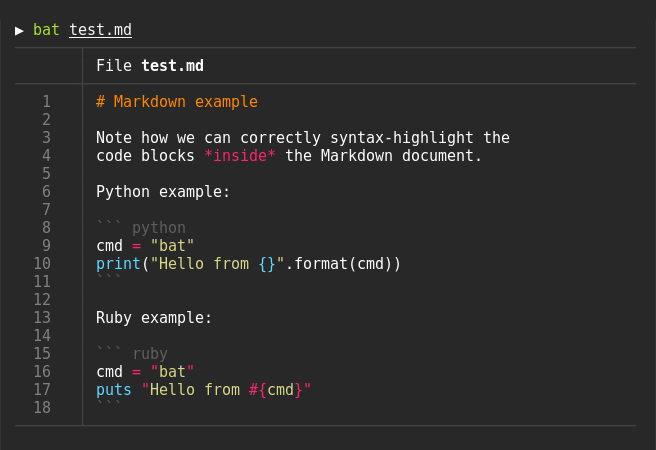
bat is a command-line file viewer that extends the functionality of the traditional cat command. It provides syntax highlighting for a large number of programming and markup languages, making code and configuration files more readable when displayed in the terminal. The tool automatically detects file types and applies appropriate syntax coloring.
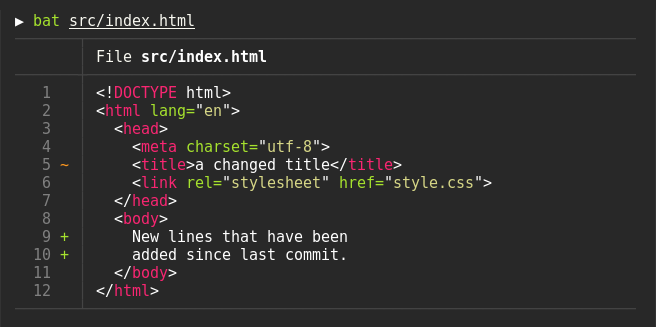
The tool integrates with Git repositories to display file modifications in the left sidebar, showing additions, deletions, and changes relative to the Git index. bat includes automatic paging functionality, piping output through less or similar pagers when content exceeds screen size, but falls back to plain cat-like behavior when piped to other processes or files.
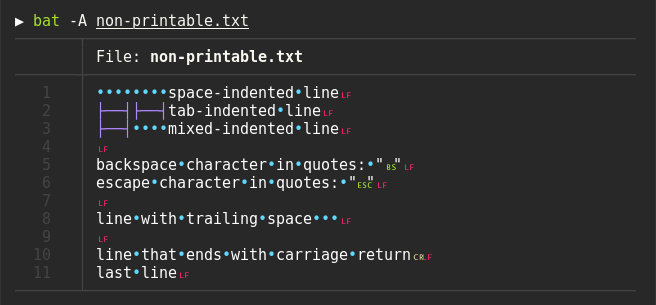
bat supports displaying non-printable characters with the -A/--show-all option and can read from stdin with automatic or explicit syntax detection. It integrates well with other command-line tools like fzf (as a file previewer), ripgrep (via batgrep), and can serve as a colorizing pager for man pages. The tool maintains backward compatibility with cat, supporting file concatenation and standard input/output redirection.
Developers, system administrators, and command-line users who frequently view code files, logs, or configuration files will find bat useful as a direct replacement for cat with enhanced readability features.
Installation
# via Homebrew
brew install bat
# via apt
sudo apt install bat
# via pacman
pacman -S bat